Sunday, July 9, 2023

ArrayDeque in Java


ArrayDeque in Java

  • ArrayDeque = Resizable array + Deque interface.
  • ArrayDeque implements the Queue & Deque interface.
  • There are no capacity restrictions for ArrayDeque, and it provides us the facility to add or remove any element from both sides of the queue.
  • Also known as Array Double Ended Queue.
  • It is faster than Linked list and stack.

Constructors of ArrayDeque class :

  1. ArrayDeque(): Used to create an empty array deque that has the capacity to hold 16 elements.
  2. ArrayDeque(int numElements): Used to create an empty array deque that has the capacity to hold the specified number of elements.
  3. ArrayDeque(Collection<? extends E> c): Used to create an array deque containing all the elements of the specified collections.

Performing Various Operation On ArrayDeque() :

  1. Inserting an element :
    • Insertion at front : add(), offerFirst() and addFirst() methods are used to insert an element at front of an array deque.

      Example :
      import java.util.*;
      public class CWH extends Thread{
          public static void main(String[] args) {
      
              ArrayDeque<Integer> ad1 = new ArrayDeque<>();
              ad1.add(6);
              ad1.add(56);
              ad1.add(9);
              ad1.addFirst(5);
              ad1.offerFirst(10);
              System.out.println(ad1);
      
          }
      }
      
Output :
[10, 5, 6, 56, 9]
Insertion At End: addLast() and offerLast() methods are used to insert an element at the end of the array deque.
Example :
import java.util.*;
public class CWH extends Thread{
    public static void main(String[] args) {

        ArrayDeque<Integer> ad1 = new ArrayDeque<>();
        ad1.add(6);
        ad1.add(56);
        ad1.add(9);
        ad1.addLast(5);
        ad1.offerLast(10);
        
        System.out.println(ad1);

    }
}
Output :
[6, 56, 9, 5, 10]
Accessing an element :
  • Accessing an element from the head of the deque array: getFirst() & peekFirst() methods are used to get the first element of the deque array.
    Example :
    import java.util.*;
    public class CWH extends Thread{
        public static void main(String[] args) {
    
            ArrayDeque<Integer> ad1 = new ArrayDeque<>();
            ad1.add(6);
            ad1.add(56);
            ad1.add(9);
            ad1.add(10);
            ad1.add(91);
            ad1.add(19);
    
            System.out.println(ad1.getFirst());
            System.out.println(ad1.peekFirst());
    
        }
    }
    
Output :
6
6
Accessing the last element: getLast() or peekLast() methods are used to print the last element of the deque array.
Example :
import java.util.*;
public class CWH extends Thread{
    public static void main(String[] args) {

        ArrayDeque<Integer> ad1 = new ArrayDeque<>();
        ad1.add(6);
        ad1.add(56);
        ad1.add(9);
        ad1.add(10);
        ad1.add(91);
        ad1.add(19);

        System.out.println(ad1.getLast());
        System.out.println(ad1.peekLast());

    }
}
Output :
19
19
Removing an element :
  • Removing the first element: removeFirst() & pollFirst() methods are used to delete an element from the head of the queue.
  • removeFirst() throws an exception if the queue is empty.
  • pollFirst() returns null if the queue is empty.
    Example :
    import java.util.*;
    public class CWH extends Thread{
        public static void main(String[] args) {
    
            ArrayDeque<Integer> ad1 = new ArrayDeque<>();
            ad1.add(6);
            ad1.add(56);
            ad1.add(9);
            ad1.add(10);
            ad1.add(91);
            ad1.add(19);
    
            ad1.pollFirst(); //deletes 6
            ad1.removeFirst(); //deletes 56
    
            System.out.println(ad1);
    
        }
    }
    
Output :
[9, 10, 91, 19]
Removing the last element: removeLast() & pollLast() methods are used to delete an element from the tail of the queue.
Example :
import java.util.*;
public class CWH extends Thread{
    public static void main(String[] args) {

        ArrayDeque<Integer> ad1 = new ArrayDeque<>();
        ad1.add(6);
        ad1.add(56);
        ad1.add(9);
        ad1.add(10);
        ad1.add(91);
        ad1.add(19);

        ad1.pollLast(); //deletes 19
        ad1.removeLast(); //deletes 91

        System.out.println(ad1);

    }
}
Output :
[6, 56, 9, 10]

Code as described/written in the video :

package com.company;

import java.util.ArrayDeque;

public class cwh_93_arraydeque {
    public static void main(String[] args) {
        ArrayDeque<Integer> ad1 = new ArrayDeque<>();
        ad1.add(6);
        ad1.add(56);
        ad1.add(9);
        ad1.addFirst(5);
        System.out.println(ad1.getFirst());
        System.out.println(ad1.getLast());
    }
}


Code as described/written in the video :

package com.company;

import java.util.ArrayDeque;

public class cwh_93_arraydeque {
    public static void main(String[] args) {
        ArrayDeque<Integer> ad1 = new ArrayDeque<>();
        ad1.add(6);
        ad1.add(56);
        ad1.add(9);
        ad1.addFirst(5);
        System.out.println(ad1.getFirst());
        System.out.println(ad1.getLast());
    }
}

LinkedList in Java: Methods


LinkedList in Java:  Methods

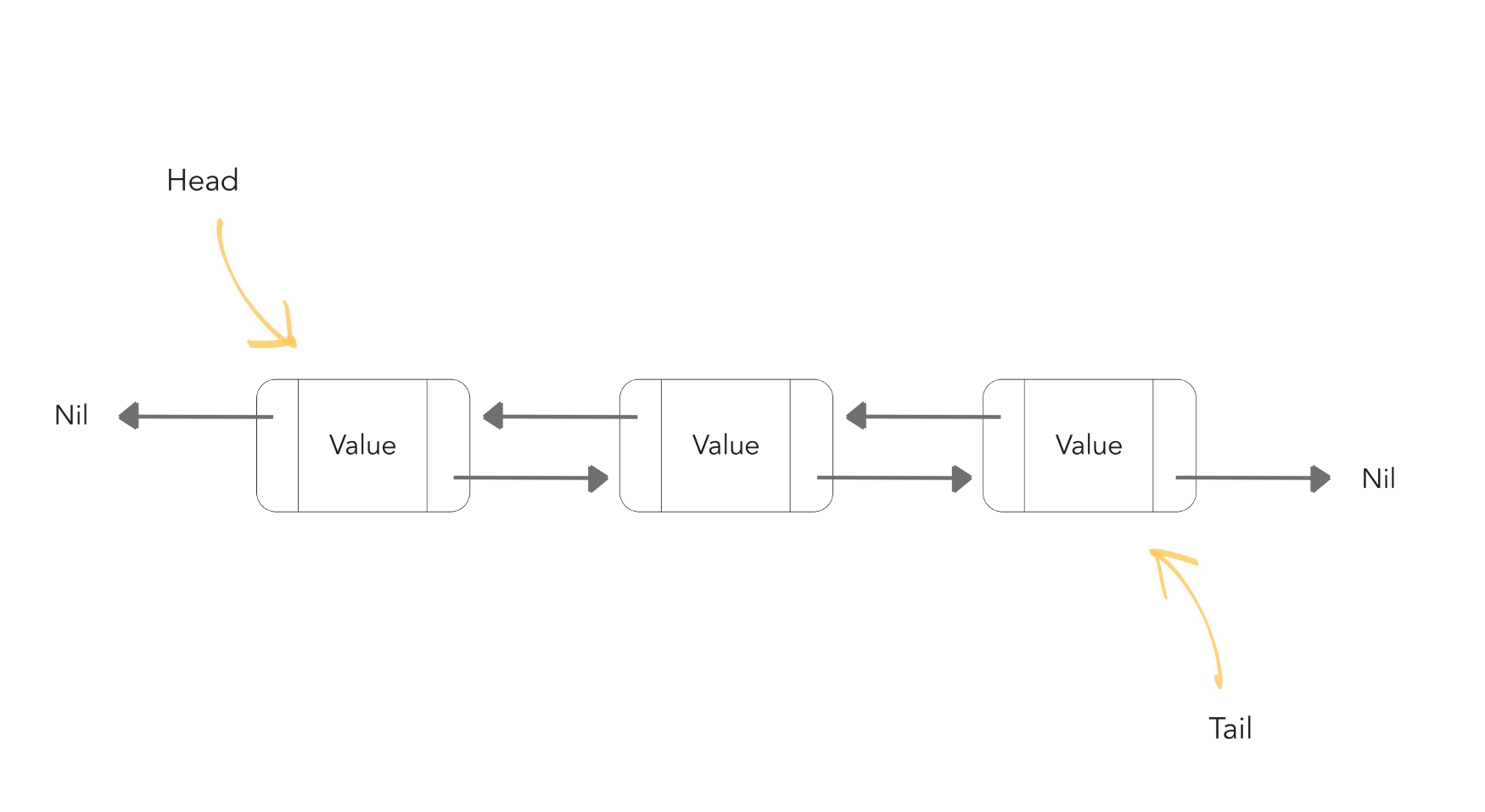
  • The LinkedList class in Java provides us with the doubly linked list data structure.
  • Each element of the linked list is known as a node.
  • Each node points to the address of the next node & its previous node.

Linkedlist image

  • Linked lists are preferred over the Array list because the insertion & deletion in the linked lists can be done in a constant time. But, in arrays, if we want to add or delete an element in between then, we need to shift all the other elements.
  • In a linked list, it is impossible to directly access an element because we need to traverse the whole linked list to get the desired element.

ArrayList Vs. LinkedList :

Although ArrayList & LinkedList both implement the List interface and have the same methods, it is important to understand when to use which one.

  • The insertion & deletion can be done in constant time in Linked List, so it is best to use the linked list when you need to add or remove elements frequently.
  • Use ArrayList when you want to access the random elements frequently, as it can’t be done in a linked list in constant time.

Performing various operations on LinkedList :

  1. Adding Element in LinkedList:
    • Similar to ArrayList, add() method is used to add elements in a linked list.
    • add(Object): Inserts an element at the end of the ArrayList.
    • add(Index,Object) : Inserts an element at the given index.
      Example :
      import java.util.*;
      public class CWH extends Thread{
          public static void main(String[] args) {
      
              LinkedList<Integer> l1 = new LinkedList<>();
      
              l1.add(11);
              l1.add(22);
              l1.add(33);
              l1.add(44);
              l1.add(55);
              l1.add(77);
              l1.add(5,77); // Inserts 77 at index 5
              System.out.println("L1 Linked list : "+ l1);
      
          }
      }
Output :
L1 Linked list : [11, 22, 33, 44, 55, 77, 77]
Removing an element from the LinkedList:
  • remove() method is used to remove an element from the linked list.

    Example :

    import java.util.*;
    public class CWH extends Thread{
        public static void main(String[] args) {
    
            LinkedList<Integer> l1 = new LinkedList<>();
    
            l1.add(11);
            l1.add(22);
            l1.add(33);
            l1.add(44);
            l1.add(55);
            l1.add(77);
            l1.add(5,77); 
            System.out.println("L1 Linked list before: "+ l1);
    
            l1.remove(2); //removes element present at 2nd index
            System.out.println("L1 Linked list after: "  + l1);
    
        }
    }
    
Output :
L1 Linked list before: [11, 22, 33, 44, 55, 77, 77]
L1 Linked list after: [11, 22, 44, 55, 77, 77]
Changing An Element Of Linked List :
  • set() method is used to change an already existing element of a linked list.

    Example :
    import java.util.*;
    public class CWH extends Thread{
        public static void main(String[] args) {
    
            LinkedList<Integer> l1 = new LinkedList<>();
    
            l1.add(11);
            l1.add(22);
            l1.add(33);
            l1.add(44);
            l1.add(55);
            l1.add(66);
            System.out.println("L1 Linked list before: "+ l1);
    
            l1.set(2,10); //changes element present at 2nd index (33 changed to 10)
            System.out.println("L1 Linked list after: "  + l1);
    
        }
    }
    
Output :
L1 Linked list before: [11, 22, 33, 44, 55, 66]
L1 Linked list after: [11, 22, 10, 44, 55, 66]
Inserting an element at the last of the linked list:
  • addlast() method is used to insert an element at the start of the linked list.

    Example :
    F.	import java.util.*;
    public class CWH extends Thread{
        public static void main(String[] args) {
    
            LinkedList<Integer> l1 = new LinkedList<>();
    
            l1.add(11);
            l1.add(22);
            l1.add(33);
            l1.add(44);
            l1.add(55);
            l1.add(66);
            System.out.println("L1 Linked list before: "+ l1);
    
            l1.addLast(100); //Inserting 100 at the end of L1
            System.out.println("L1 Linked list after inserting element at last index: "  + l1);
    
        }
    }
    
Output :
L1 Linked list before: [11, 22, 33, 44, 55, 66]
L1 Linked list after inserting element at last index: [11, 22, 33, 44, 55, 66, 100]
Inserting an element at the start of the linked list:
  • addFirst() method is used to insert an element at the start of the linked list.

    Example :
    import java.util.*;
    public class CWH extends Thread{
        public static void main(String[] args) {
    
            LinkedList<Integer> l1 = new LinkedList<>();
    
            l1.add(11);
            l1.add(22);
            l1.add(33);
            l1.add(44);
            l1.add(55);
            l1.add(66);
            System.out.println("L1 Linked list before: "+ l1);
    
            l1.addFirst(0); //Inserting 0 at the starting of L1
            System.out.println("L1 Linked list after: "  + l1);
    
        }
    }
    

Output :

L1 Linked list before: [11, 22, 33, 44, 55, 66]
L1 Linked list after: [0, 11, 22, 33, 44, 55, 66]

Code as described/written in the video :

package com.company;

import java.util.*;

public class cwh_92_linkedlist {
    public static void main(String[] args) {
        LinkedList<Integer> l1 = new LinkedList<>();
        LinkedList<Integer> l2 = new LinkedList<>();
        l2.add(15);
        l2.add(18);
        l2.add(19);

        l1.add(6);
        l1.add(7);
        l1.add(4);
        l1.add(6);
        l1.add(0, 5);
        l1.add(0, 1);
        l1.addAll(0, l2);
        l1.addLast(676);
        l1.addFirst(788);
        System.out.println(l1.contains(27));
        System.out.println(l1.indexOf(6));
        System.out.println(l1.lastIndexOf(6));
        //l1.clear();
        l1.set(1, 566);
        for(int i=0; i<l1.size(); i++){
            System.out.print(l1.get(i));
            System.out.print(", ");
        }
    }
}

ArrayList in Java:


ArrayList in Java: Methods

  • The ArrayList class is the dynamic array found in the java.util package.
  • The size of the normal array can not be changed, but ArrayList provides us the ability to increase or decrease the size.
  • ArrayList is slower than the standard array, but it helps us to manipulate the data easily.

How to declare an ArrayList :

ArrayList<Integer> l1 = new ArrayList<>(); /*Creates an ArrayList object of
                                           integer type */

Performing various operations on ArrayList :

ArrayList comes with a number of methods that can be used to manipulate the data of the ArrayList. Let’s take a look at some of the important methods of ArrayList :

  1. Adding an element :
    • add() method is used to insert an element in the ArrayList.
    • add(Object): Inserts an element at the end of the ArrayList.
    • add(Index,Object) : Inserts an element at the given index.
      Example :
      import java.util.*;
      public class CWH extends Thread{
          public static void main(String[] args) {
      
              ArrayList<Integer> l1 = new ArrayList<>();
              l1.add(1);
              l1.add(2);
              l1.add(3);
              l1.add(4);
              l1.add(6);
              l1.add(5,5);  // inserts 5 at the 5th index in l1
      
              System.out.println(l1);
          }
      }
      
Output :
[1, 2, 3, 4, 6, 5]
  •  Removing an Element :
    • remove() method is used to delete or remove an element at a given index from the ArrayList.
      Syntax :
      L1.remove(index number) 
  • Example :
    import java.util.*;
    public class CWH extends Thread{
        public static void main(String[] args) {
    
            ArrayList<Integer> l1 = new ArrayList<>();
            l1.add(1);
            l1.add(2);
            l1.add(3);
            l1.add(4);
            l1.add(6);
            l1.add(5,5);  // inserts 5 at the 5th index in l1
    
            System.out.println("Array list before : "+ l1);
    
            l1.remove(0);
            System.out.println("ArrayList after removing the value at index 0 :" + l1);
    
        }
    }
    
    Output :
    Array list before : [1, 2, 3, 4, 6, 5]
    ArrayList after removing the value at index 0 : [2, 3, 4, 6, 5]
    
     Checking if an ArrayList contains a specific value or not : 
    • contains() method is used to check if an ArrayList contains a specified element or not. This method returns the boolean value.
      Example :
      import java.util.*;
      public class CWH extends Thread{
          public static void main(String[] args) {
      
              ArrayList<Integer> l1 = new ArrayList<>();
              l1.add(1);
              l1.add(2);
              l1.add(3);
              l1.add(4);
              l1.add(5);
              l1.add(6);
      
              System.out.println("Array list : "+ l1);
              System.out.println("L1 list contains 7 : " + l1.contains(7));
              System.out.println("L1 list contains 4 : " + l1.contains(4));
      
      
          }
      }
      
    Output :
    Array list before : [1, 2, 3, 4, 5, 6]
    L1 list contains 7 : false
    L1 list contains 4 : true
    
  • Merging two ArrayLists :
    • The elements of an ArrayList can be merged into another Arraylist with the help of the addAll() method.
      Example :
      import java.util.*;
      public class CWH extends Thread{
          public static void main(String[] args) {
      
              ArrayList<Integer> l1 = new ArrayList<>();
              ArrayList<Integer> l2 = new ArrayList<>();
      
              l1.add(1);
              l1.add(2);
              l1.add(3);
              l1.add(4);
              l1.add(5);
              l1.add(6);
      
              l2.add(11);
              l2.add(12);
              l2.add(13);
              l2.add(14);
      
              System.out.println("L1 Array list : "+ l1);
              System.out.println("L2 Array list : " +l2);
              l1.addAll(l2);
              System.out.println("L1 Array list after merging: "+ l1);
              System.out.println("L2 Array list : " +l2);
      
              
          }
      }
      
  • Output :
    L1 Array list : [1, 2, 3, 4, 5, 6]
    L2 Array list : [11, 12, 13, 14]
    L1 Array list after merging: [1, 2, 3, 4, 5, 6, 11, 12, 13, 14]
    L2 Array list : [11, 12, 13, 14]
    
  • You can add the elements of l2 at the starting of l1 by typing :
    L1.addAll(0,l2);
  • Finding the first occurrence of a specified number in the ArrayList :
    • Indexof() method prints the index of the first occurrence of a particular number. Returns -1 if the element is not present in the ArrayList.

      Example :
      import java.util.*;
      public class CWH extends Thread{
          public static void main(String[] args) {
      
              ArrayList<Integer> l1 = new ArrayList<>();
      
              l1.add(1);
              l1.add(2);
              l1.add(3);
              l1.add(4);
              l1.add(5);
              l1.add(6);
              l1.add(3);
      
              System.out.println("L1 Array list : "+ l1);
              System.out.println("The first occurrence of 3 in l1 is at index : " + l1.indexOf(3));
      
      
          }
      
    Output :
    L1 Array list : [1, 2, 3, 4, 5, 6, 3]
    The first occurrence of 3 in l1 is at index : 2
    

    Similarly, you can also find the index of the last occurrence of an element with the help of the lastIndexOf() method.

    Example :
    import java.util.*;
    public class CWH extends Thread{
        public static void main(String[] args) {
    
            ArrayList<Integer> l1 = new ArrayList<>();
    
            l1.add(1);
            l1.add(2);
            l1.add(3);
            l1.add(4);
            l1.add(5);
            l1.add(3);
            l1.add(6);
            l1.add(3);
    
            System.out.println("L1 Array list : "+ l1);
            System.out.println("The last occurrence of 3 in l1 is at index : " + l1.lastIndexOf(3));
    
    
        }
    }
    
    Output :

    Inheritance in Java


    Inheritance in Java

    • You might have heard people saying your nose is similar to your father or mother. Or, more formally, we can say that you've inherited the genes from your parents due to which you look similar to them.
    • The same phenomenon of inheritance is also valid in programming.
    • In Java, one class can easily inherit the attributes and methods from some other class. This mechanism of acquiring objects and properties from some other class is known as inheritance in Java.
    • Inheritance is used to borrow properties & methods from an existing class.
    • Inheritance helps us create classes based on existing classes, which increases the code's reusability.
      Examples :

    Important terminologies used in Inheritance :

    1. Parent class/superclass: The class from which a class inherits methods and attributes is known as parent class.
    2. Child class/sub-class: The class that inherits some other class's methods and attributes is known as child class.

    Extends keyword in inheritance :

    • The extends keyword is used to inherit a subclass from a superclass. 
      Syntax :
      class Subclass-name extends Superclass-name  
      {  
         //methods and fields  
      } 


    Example :
    public class dog extends Animal { 
                  // code 
                     }

    Note: Java doesn't support multiple inheritances, i.e., two classes cannot be the superclass for a subclass.

    Quick quiz: Create a class Animal and Derive another class dog from it 

    package com.company;
    
    class Base{
        public int x;
    
        public int getX() {
            return x;
        }
    
        public void setX(int x) {
            System.out.println("I am in base and setting x now");
            this.x = x;
        }
    
        public void printMe(){
            System.out.println("I am a constructor");
        }
    }
    
    class Derived extends Base{
        public int y;
    
        public int getY() {
            return y;
        }
    
        public void setY(int y) {
            this.y = y;
        }
    }
    
    public class cwh_45_inheritance {
        public static void main(String[] args) {
            // Creating an Object of base class
            Base b = new Base();
            b.setX(4);
            System.out.println(b.getX());
    
            // Creating an object of derived class
            Derived d = new Derived();
            d.setY(43);
            System.out.println(d.getY());
        }
    }
    

    Object-Oriented-Programming-Java

     Object-Oriented-Programming Language :In Simple  way

    1. Abstraction :

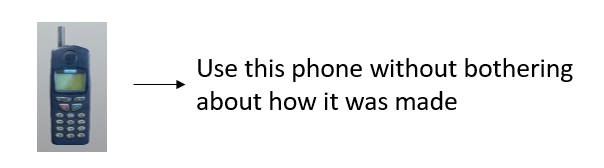
      • Let's suppose you want to turn on the bulb in your room. What do you do to switch on the bulb. You simply press the button and the light bulb turns on. Right? Notice that here you're only concerned with your final result, i.e., turning on the light bulb. You do not care about the circuit of the bulb or how current flows through the bulb. The point here is that you press the switch, the bulb turns on! You don't know how the bulb turned on/how the circuit is made because all these details are hidden from you. This phenomenon is known as abstraction. 
      • More formally, data abstraction is the way through which only the essential info is shown to the user, and all the internal details remain hidden from the user.
        Example :
    2. Polymorphism :

      • One entity many forms.
      • The word polymorphism comprises two words, poly which means many, and morph, which means forms.
      • In OOPs, polymorphism is the property that helps to perform a  single task in different ways.
      • Let us consider a real-life example of polymorphism. A woman at the same time can be a mother, wife, sister, daughter, etc. Here, a woman is an entity having different forms.
      • Let's take another example, a smartphone can work like a camera as well as like a calculator. So, you can see the a smartphone is an entity having different forms. Also :

    3. Encapsulation :

      • The act of putting various components together (in a capsule).
      • In java, the variables and methods are the components that are wrapped inside a single unit named class.
      • All the methods and variables of a class remain hidden from any other class.
      • A automatic cold drink vending machine is an example of encapsulation.
      • Cold drinks inside the machine are data that is wrapped inside a single unit cold drink vending machine.
    4. Inheritance :

      • The act of deriving new things from existing things.
      • In Java, one class can acquire all the properties and behaviours of other some other class
      • The class which inherits some other class is known as child class or sub class.
      • The class which is inherited is known as parent class or super class.
      • Inheritance helps us to write more efficient code because it increases the reusablity of the code.
      • Example : 
      • Rickshaw      →        E-Rickshaw
      •  Phone           →        Smart Phone